The case record
Opening a case shows the case detail screen — everything the assistant gathered, laid out top to bottom. This is where a caseworker reads in before an appointment.
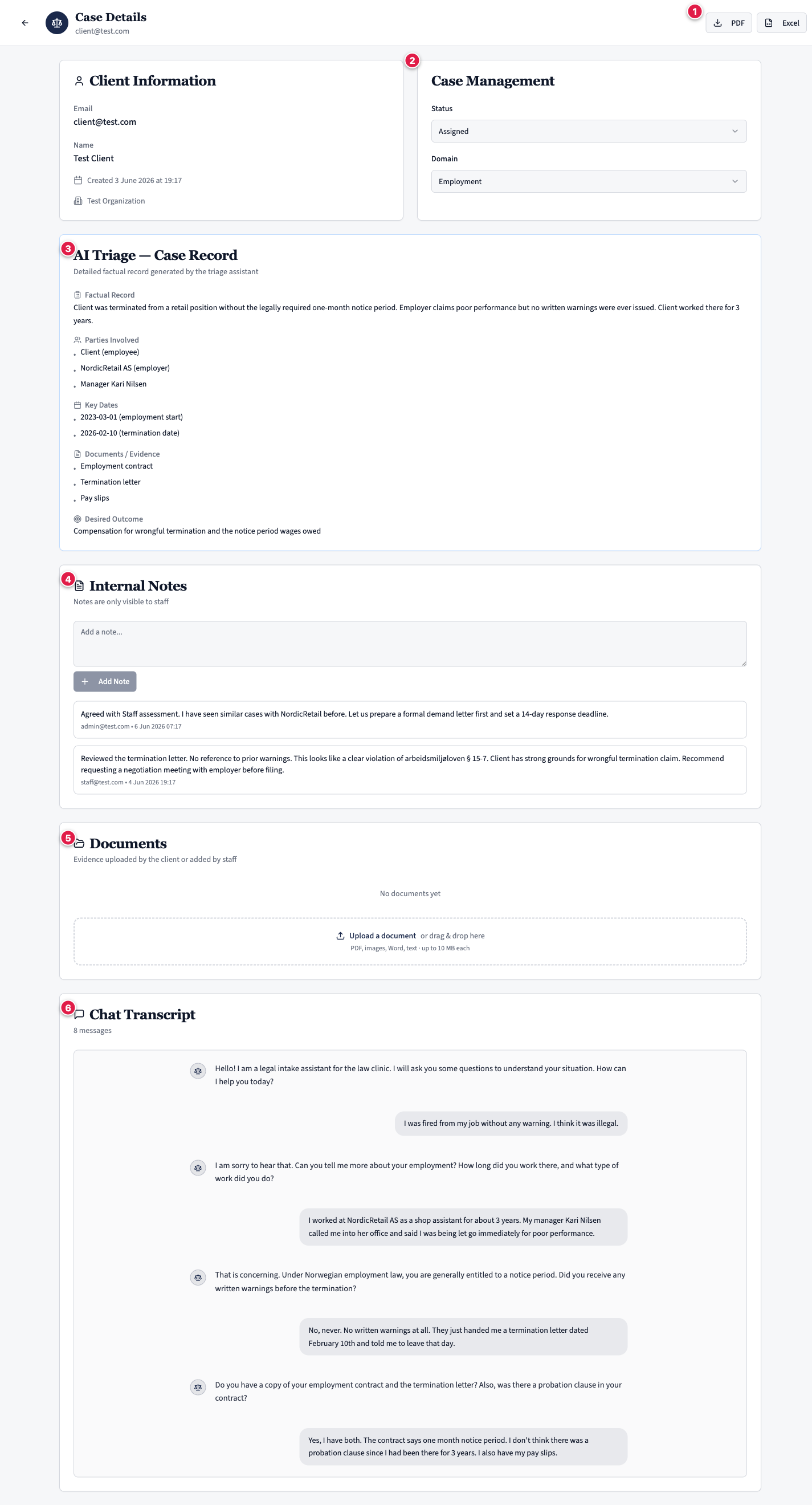
Client Information
Email, name, the date the case was created, and the clinic it belongs to.
Case Management
Two editable selectors:
- Status — where the case sits in your workflow.
- Domain — the legal area. Change it here if the assistant got it wrong.
See Working a case for how to use these.
AI Triage — Case Record
The structured output the assistant produced and the client approved. It has six fields:
- Domain — the broad legal area.
- Factual Record — a full, third-person account of the client's situation.
- Parties — everyone involved, with their role and context.
- Key Dates — each relevant date and what happened on it.
- Documents / Evidence — evidence the client mentioned, and whether they hold a copy.
- Desired Outcome — what the client wants to happen, in their words.
Case Record vs Factual Record
These two terms are easy to mix up:
- The Case Record is the whole structured output — all six fields together.
- The Factual Record is one field within it: the narrative account. It is a complete, third-person write-up of the situation — typically 300–500+ words — not a one-line summary.
Internal Notes
Notes added by staff. They are timestamped and attributed, and are never visible to the client.
Documents
Files uploaded against the case — by the client during intake, or by staff afterwards. Distinct from the "Documents / Evidence" field above, which simply lists what the client said they have.
The assistant sees only the file names of what the client uploaded, not the contents, so it does not read these files. Open a document to read it yourself — see Working a case.
Chat Transcript
The full client–assistant conversation, kept so you can see exactly how each fact in the record was gathered. A clinic administrator or super admin can permanently delete this transcript — see Working a case.