How it works
Here is a single case, start to finish — from the client's first message to a caseworker picking it up.
1. The client signs in
The client signs in with their email, chooses your clinic, and gives their name. They are told their information will be shared with the selected clinic for legal triage.
2. Guided intake
The assistant leads a focused conversation, asking one to three short questions at a time and moving through one stage at a time. It captures the facts, the people involved, and the relevant dates. It only asks for what triage needs — it does not fish for personal details.
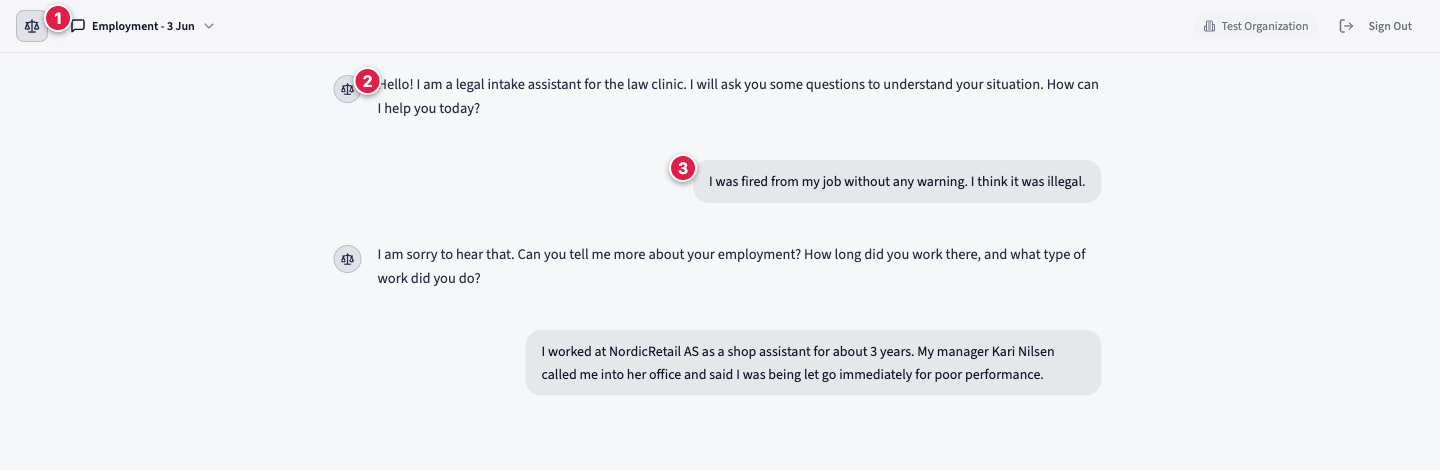
If a client signals they are in immediate danger, the assistant surfaces 999 (or 101 for non-emergency police) before anything else.
3. Quality safeguard
Before the client ever sees the record, a second, stronger model reviews it against a checklist of the essential questions for that legal area. If something essential is missing, the assistant is sent back to ask before it can continue. This is why records arrive complete. See The quality safeguard.
4. Review and approve
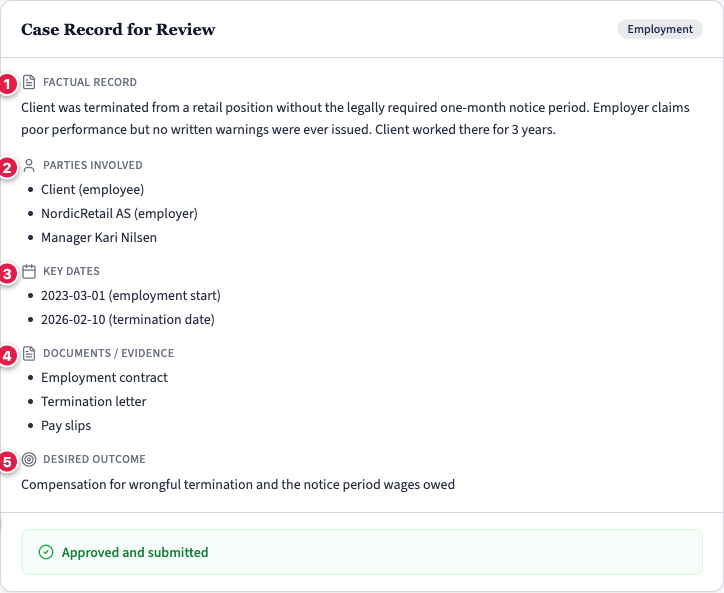
The assistant presents the full Case Record and the client reads it, then either approves it or asks for corrections. Nothing is submitted that the client has not reviewed.
5. It lands in your dashboard
Once approved, the record is finalised to your clinic and appears as a case with the status In review. From there a caseworker can read it, add notes, change its status, and prepare for the appointment — without the client having to retell their story.
6. Export and handoff
When you are ready, export the case to PDF or Excel and hand it off into your own systems. See Export & handoff.
The whole journey: client signs in → guided intake → quality safeguard → client approves → case lands in the dashboard → caseworker works it → export & handoff.